# API
> 💡 **Python 开发者:** 使用官方 [clore-ai Python SDK](https://docs.clore.ai/clore.ai/clore.ai-eng-zh/kai-fa-zhe/python-sdk) 而不是直接调用 API。它会自动处理认证、速率限制、重试和错误处理。
>
> **快速开始:** `pip install clore-ai` — 参见 [Python SDK 文档](https://docs.clore.ai/clore.ai/clore.ai-eng-zh/kai-fa-zhe/python-sdk) 和 [CLI 参考](https://docs.clore.ai/clore.ai/clore.ai-eng-zh/kai-fa-zhe/cli-guide).
### 简介
[CLORE.AI](http://clore.ai/) api 可用于将您的工作负载自动部署到 [CLORE.AI](http://clore.ai/)
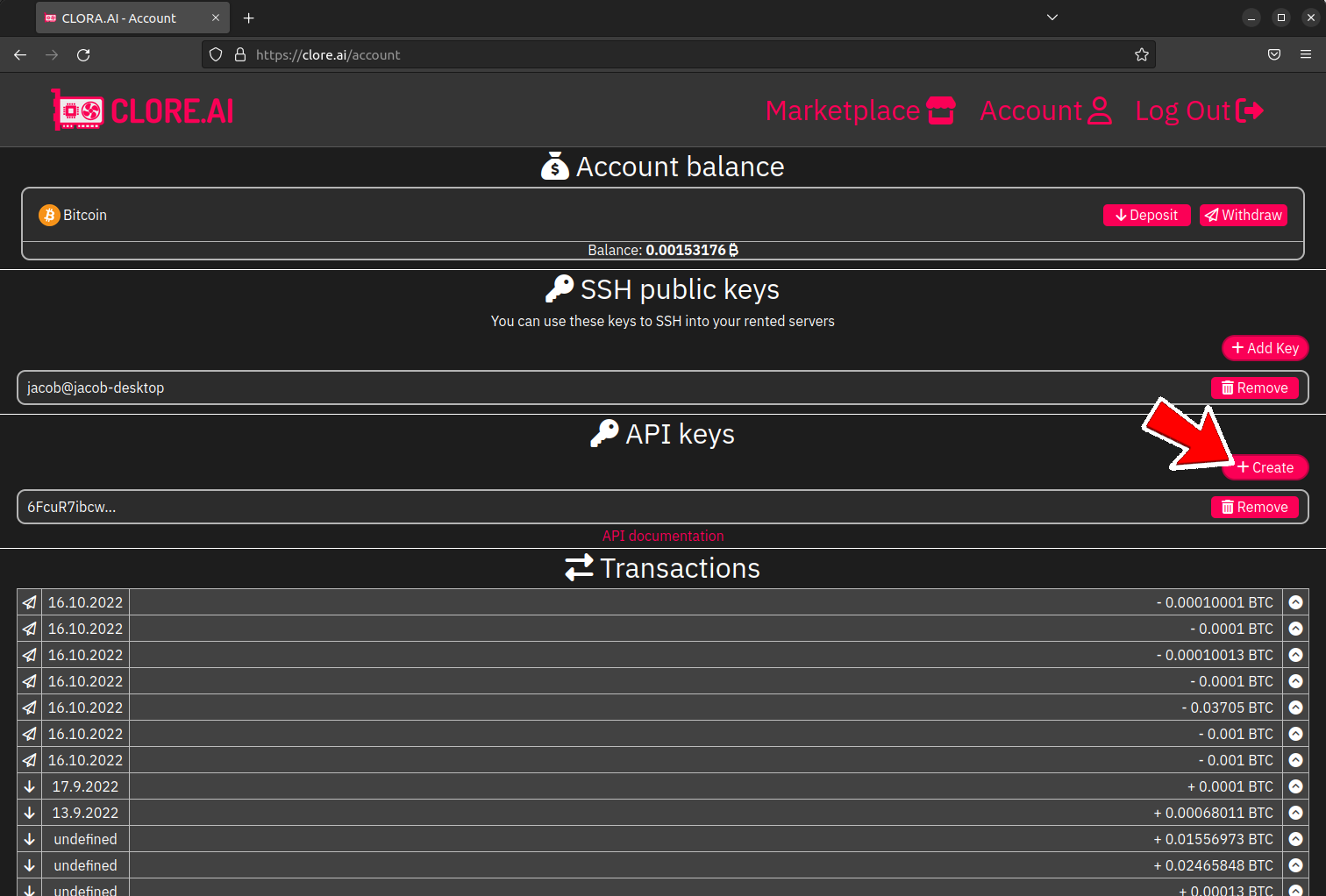
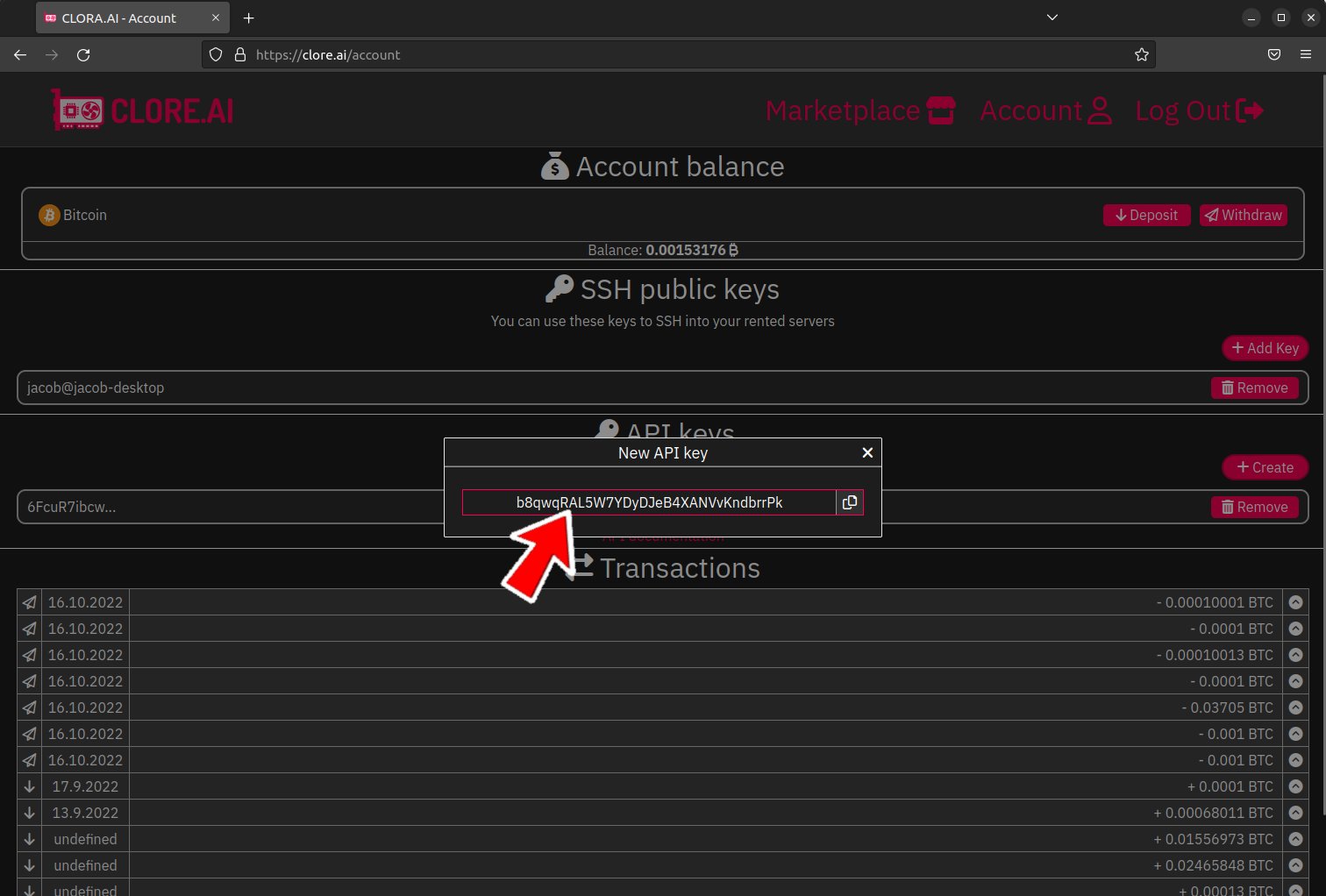
首先您需要获取 API 密钥\
\
***
### API 响应
响应以 JSON 格式返回,字段可能不同
始终返回的字段是 code,表示状态
**code 字段**
| 代码 | 描述 |
| --- | ------------ |
| `0` | 正常 |
| `1` | 数据库 错误 |
| `2` | 无效的输入数据 |
| `3` | 无效的 API 令牌 |
| `4` | 无效的端点 |
| `5` | 超过 1 请求/秒 限制 |
| `6` | 错误在 `错误` 字段 |
***
### 端点
#### 1. `钱包`
**关于**
返回钱包和余额
**请求头**
| 字段 | 类型 | 必填 | 描述 |
| ------ | ----- | -- | ------ |
| `auth` | `字符串` | 是 | API 令牌 |
**输出**
| 字段 | 类型 | 描述 |
| ---- | ------- | ----- |
| `代码` | `整数` | 状态 代码 |
| `钱包` | `[]字符串` | 钱包数组 |
**示例**
**输入:**
```
curl -XGET -H 'auth: b8qwqRAL5W7YDyDJeB4XANVvKndbrrPk' 'https://api.clore.ai/v1/wallets'
```
**输出:**
```
{
"wallets": [
{
"name": "bitcoin",
"deposit": "tb1q6erw7v02t7hakgmlcl4wfnlykzqj05alndruwr",
"balance": 0.00153176,
"withdrawal_fee": 0.0001
}
],
"code": 0
}
```
#### 2. `my_servers`
**关于**
返回您提供给 [clore.ai 的服务器](http://clore.ai/) 市场
**请求头**
| 字段 | 类型 | 必填 | 描述 |
| ------ | ----- | -- | ------ |
| `auth` | `字符串` | 是 | API 令牌 |
**输出**
| 字段 | 类型 | 描述 |
| ----------------------------- | ------- | ------------------------------------------- |
| `代码` | `整数` | 状态 代码 |
| `限制` | `整数` | 您可拥有的服务器最大数量 |
| `服务器` | `[]字符串` | 服务器数组 |
| `servers[x].name` | `字符串` | 用户选择的服务器名称 |
| `servers[x].connected` | `字符串` | 服务器是否曾连接到 [clore.ai 的服务器](http://clore.ai/) |
| `servers[x].visibility` | `字符串` | 市场上的可见性 |
| `servers[x].pricing` | `[]字符串` | 按日按需价格 |
| `servers[x].online` | `布尔值` | 服务器是否在线 |
| `servers[x].min_spot_pricing` | `[]字符串` | 在现货市场出租的最低每日价格 |
| `servers[x].init_token` | `字符串` | 初始化令牌 |
| `servers[x].specs` | `[]字符串` | 服务器规格 |
**示例**
**输入:**
```
curl -XGET -H 'auth: b8qwqRAL5W7YDyDJeB4XANVvKndbrrPk' 'https://api.clore.ai/v1/my_servers'
```
**输出:**
```
{
"servers": [
{
"name": "Michael",
"connected": false,
"visibility": "hidden",
"pricing": { "bitcoin": 0, "usd": 0 },
"online": false,
"min_spot_pricing": { "bitcoin": 0, "usd": 0 },
"init_token": "qnwVIMsZPjUWS7jw6gAbTOeoGQNgTH9XVxJaiCEbG0OlmfjF"
},
{
"name": "Jan Vykydal",
"connected": true,
"visibility": "public",
"pricing": { "bitcoin": 0.00010337, "usd": 0 },
"online": false,
"min_spot_pricing": { "bitcoin": 0.00005168, "usd": 0 },
"specs": {
"mb": "Z590 GAMING X",
"cpu": "Intel Core i9-11900",
"cpus": "8/16",
"ram": 64,
"disk": "NVMe 512GB",
"disk_speed": 2000,
"gpu": "1x GeForce GTX 1080 Ti",
"gpuram": 11,
"net": {
"down":119.61,
"up":25.24
}
}
}
],
"limit": 16,
"code": 0
}
```
**\*USD 尚未实现**
#### 3. `server_config`
**关于**
获取特定服务器的配置
**请求头**
| 字段 | 类型 | 必填 | 描述 |
| -------------- | ----- | -- | ---------------------- |
| `auth` | `字符串` | 是 | API 令牌 |
| `Content-type` | `字符串` | 是 | 必须是 `application/json` |
**请求体**
| 字段 | 类型 | 必填 | 描述 |
| ------------- | ----- | -- | ----- |
| `server_name` | `字符串` | 是 | 服务器名称 |
**输出**
| 字段 | 类型 | 描述 |
| ----------------------- | ------- | ------------------------------------------- |
| `代码` | `整数` | 状态 代码 |
| `creation_completed` | `布尔值` | 服务器创建是否完成 |
| `config` | `[]字符串` | 服务器的配置 |
| `config.name` | `字符串` | 用户选择的服务器名称 |
| `config.connected` | `布尔值` | 服务器是否曾连接到 [clore.ai 的服务器](http://clore.ai/) |
| `config.visibility` | `字符串` | 市场上的可见性 |
| `config.pricing` | `[]字符串` | 按日按需价格 |
| `config.spot_pricing` | `[]字符串` | 在现货市场出租的最低每日价格 |
| `config.mrl` | `整数` | 最大租赁时长(小时) |
| `config.online` | `布尔值` | 服务器是否在线 |
| `config.initialized` | `布尔值` | 服务器是否曾连接到 [clore.ai 的服务器](http://clore.ai/) |
| `config.id` | `整数` | 唯一服务器 ID |
| `config.rental_status` | `整数` | 0 - 未租用 \| 1 - 在现货市场出租 \| 2 - 按需出租 |
| `config.specs` | `[]字符串` | 服务器规格 |
| `config.background_job` | `[]字符串` | 未被租用时的后台任务 |
**示例**
**输入:**
```
curl -XGET -H 'auth: b8qwqRAL5W7YDyDJeB4XANVvKndbrrPk' -H "Content-type: application/json" -d '{
"server_name":"Jan Vykydal"
}' 'https://api.clore.ai/v1/server_config'
```
**输出:**
```
{
"config": {
"name": "Jan Vykydal",
"connected": true,
"visibility": "public",
"pricing": { "bitcoin": 0.00010337, "usd": 0 },
"spot_pricing": { "bitcoin": 0.00005168, "usd": 0 },
"mrl": 72,
"online": false,
"initialized": true,
"id": 4,
"rental_status": 0,
"specs": {
"mb": "Z590 GAMING X",
"cpu": "Intel Core i9-11900",
"cpus": "8/16",
"ram": 64,
"disk": "NVMe 512GB",
"disk_speed": 2000,
"gpu": "1x GeForce GTX 1080 Ti",
"gpuram": 11,
"net": {
"down":119.61,
"up":25.24
}
},
"background_job": {
"times_updated": 1,
"image": "cloreai/ubuntu20.04-jupyter",
"command": "",
"env": []
}
},
"creation_completed": true,
"code": 0
}
```
**\*USD 尚未实现**
#### 4. `市场`
**关于**
获取市场
**请求头**
| 字段 | 类型 | 必填 | 描述 |
| ------ | ----- | -- | ------ |
| `auth` | `字符串` | 是 | API 令牌 |
**输出**
| 字段 | 类型 | 描述 |
| ---------------------------- | ------- | ------------------------------------------------------- |
| `代码` | `整数` | 状态 代码 |
| `my_servers` | `[]字符串` | 您提供的服务器 ID 列表 [clore.ai 的服务器](http://clore.ai/) (无法被租用) |
| `服务器` | `[]字符串` | 市场上的公共服务器数组 |
| `servers[x].id` | `整数` | 唯一服务器 ID |
| `servers[x].owner` | `整数` | 唯一所有者 ID |
| `servers[x].mrl` | `整数` | 最大租赁时长(小时) |
| `servers[x].price.on_demand` | `[]字符串` | 按需日价格 |
| `servers[x].spot` | `[]字符串` | 现货市场最低日价格 |
| `servers[x].rented` | `布尔值` | 服务器是否被按需租用 |
| `servers[x].specs` | `[]字符串` | 服务器规格 |
**示例**
获取市场
**输入:**
```
curl -XGET -H 'auth: b8qwqRAL5W7YDyDJeB4XANVvKndbrrPk' 'https://api.clore.ai/v1/marketplace'
```
**输出:**
```
{
"servers": [
{
"id": 6,
"owner": 4,
"mrl": 73,
"price": { "on_demand": { "bitcoin": 0.00001 },
"spot": { "bitcoin": 0.000001 }},
"rented": false,
"specs": {
"mb": "Z590 GAMING X",
"cpu": "第11代 Intel(R) Core(TM) i9-11900 @ 2.50GHz",
"cpus": "8/16",
"ram": 62.67348861694336,
"disk": "NVMe 磁盘 247.3623046875GB",
"disk_speed": 0,
"gpu": "1x NVIDIA GeForce GTX 1080 Ti",
"gpuram": 11,
"net": {
"up": 26.38,
"down": 118.42,
"cc": "CZ"
}
}
}
],
"my_servers": [1, 2, 4],
"code": 0
}
```
#### 5. `my_orders`
**关于**
获取您的订单
**请求头**
| 字段 | 类型 | 必填 | 描述 |
| ------ | ----- | -- | ------ |
| `auth` | `字符串` | 是 | API 令牌 |
**查询字符串**
| 字段 | 类型 | 必填 | 描述 |
| ------------------ | ----- | -- | ------------ |
| `return_completed` | `布尔值` | 否 | 返回已完成(已过期)订单 |
**输出**
| 字段 | 类型 | 描述 |
| ------------------------ | ------- | --------------------------------------------- |
| `代码` | `整数` | 状态 代码 |
| `限制` | `整数` | 最大活跃订单数 |
| `订单` | `[]字符串` | 订单数组 |
| `orders[x].id` | `整数` | 唯一订单 ID |
| `orders[x].fee` | `浮点数` | 支付给 的手续费(%) [clore.ai 的服务器](http://clore.ai/) |
| `orders[x].creation_fee` | `浮点数` | 支付给 的创建费 [clore.ai 的服务器](http://clore.ai/) |
| `orders[x].price` | `浮点数` | 订单价格(每天成本) |
| `orders[x].mrl` | `整数` | 订单最大租赁时长(秒) |
| `orders[x].image` | `字符串` | 使用的 Docker 镜像 |
| `orders[x].currency` | `字符串` | 计费使用的货币 |
| `orders[x].spend` | `浮点数` | 订单消费金额 |
| `orders[x].ct` | `整数` | 创建时间(UNIX 时间) |
| `orders[x].p` | `整数` | 当前使用的代理集群 |
| `orders[x].specs` | `[]字符串` | 服务器规格 |
| `orders[x].si` | `整数` | 唯一服务器 ID |
| `orders[x].pub_cluster` | `[]字符串` | 带转发端口的公共端点 |
| `orders[x].tcp_ports` | `[]字符串` | TCP 端口转发 |
| `orders[x].http_port` | `字符串` | 通过 HTTPS 代理转发的容器端口 |
| `orders[x].spot` | `布尔值` | 表示这是现货订单 |
| `orders[x].expired` | `布尔值` | 表示订单已过期 |
**输入:**
```
curl -XGET -H 'auth: b8qwqRAL5W7YDyDJeB4XANVvKndbrrPk' 'https://api.clore.ai/v1/my_orders?return_completed=true'
```
**输出:**
```
{
"orders": [
{
"id": 38,
"fee": 5,
"creation_fee": 3e-7,
"price": 0.00001,
"mrl": 262800,
"image": "cloreai/ubuntu20.04-jupyter",
"currency": "bitcoin",
"spend": 6.944444444444445e-9,
"ct": 1667401396,
"p": 1,
"specs": {
"mb": "Z590 GAMING X",
"cpu": "第11代 Intel(R) Core(TM) i9-11900 @ 2.50GHz",
"cpus": "8/16",
"ram": 62.67348861694336,
"disk": "NVMe 磁盘 247.3623046875GB",
"disk_speed": 2000,
"gpu": "1x NVIDIA GeForce GTX 1080 Ti",
"gpuram": 11,
"net": {
"up": 26.38,
"down": 118.42,
}
},
"si": 6,
"pub_cluster": [ "n1.c1.clorecloud.net", "n2.c1.clorecloud.net" ],
"tcp_ports": [ "22:10000" ],
"http_port": "8888"
},{
"id": 36,
"fee": 2.5,
"creation_fee": 1e-7,
"price": 0.00001,
"mrl": 262800,
"image": "cloreai/ubuntu20.04-jupyter",
"currency": "bitcoin",
"spend": 1.3888888888888888e-7,
"ct": 1667248597,
"specs": {
"mb": "Z590 GAMING X",
"cpu": "第11代 Intel(R) Core(TM) i9-11900 @ 2.50GHz",
"cpus": "8/16",
"ram": 62.67348861694336,
"disk": "NVMe 磁盘 247.3623046875GB",
"disk_speed": 2000,
"gpu": "1x NVIDIA GeForce GTX 1080 Ti",
"gpuram": 11,
"net": {
"up": 26.38,
"down": 118.42,
}
},
"si": 6,
"spot": true,
"expired": true,
"tcp_ports": []
}
],
"limit": 13,
"code": 0
}
```
#### 6. `现货市场`
**关于**
获取特定服务器的现货市场
**请求头**
| 字段 | 类型 | 必填 | 描述 |
| ------ | ----- | -- | ------ |
| `auth` | `字符串` | 是 | API 令牌 |
**查询字符串**
| 字段 | 类型 | 必填 | 描述 |
| -------- | ---- | -- | -------- |
| `market` | `整数` | 是 | 唯一服务器 ID |
**输出**
| 字段 | 类型 | 描述 |
| --------------------------- | ----- | --------------------- |
| `代码` | `整数` | 状态 代码 |
| `存在` | `布尔值` | 验证市场是否存在 |
| `market` | `对象` | 市场 |
| `market.offers` | `数组` | 该服务器的租赁报价 |
| `market.offers[x].offer_id` | `整数` | 唯一报价 ID |
| `market.offers[x].bid` | `浮点数` | 报价的每日价格 |
| `market.offers[x].active` | `布尔值` | 该报价当前是否被使用 |
| `market.offers[x].my` | `布尔值` | 该报价是否属于我 |
| `market.server` | `对象` | 服务器信息 |
| `market.server.min_pricing` | `对象` | 最低报价每日价格 |
| `market.server.mrl` | `整数` | 最大租赁时长(秒) |
| `market.server.visibility` | `字符串` | 仅当可见性为 public 时才能创建报价 |
| `market.server.online` | `布尔值` | 服务器在线 |
**输入:**
```
curl -XGET -H 'auth: b8qwqRAL5W7YDyDJeB4XANVvKndbrrPk' 'https://api.clore.ai/v1/spot_marketplace?market=6'
```
**输出:**
```
{
"market": {
"offers": [
{
"offer_id": 39,
"bid": 0.0000042,
"active": true,
"my": true
}
],
"server": {
"min_pricing": {
"bitcoin": 0.000001
},
"mrl": 262800,
"visibility": "public",
"online": true
}
},
"exists": true,
"code": 0
}
```
#### 7. `set_server_settings`
**关于**
配置您在 上提供的服务器的设置 [clore.ai 的服务器](http://clore.ai/) 市场
**请求头**
| 字段 | 类型 | 必填 | 描述 |
| -------------- | ----- | -- | ---------------------- |
| `auth` | `字符串` | 是 | API 令牌 |
| `Content-type` | `字符串` | 是 | 必须是 `application/json` |
**请求体**
| 字段 | 类型 | 必填 | 描述 |
| ----- | ----- | -- | -------------- |
| `名称` | `字符串` | 是 | 用户选择的服务器名称 |
| `可用性` | `布尔值` | 是 | 服务器是否可以被租用 |
| `mrl` | `整数` | 是 | 服务器最大租赁时长 |
| `按需` | `浮点数` | 是 | 您服务器按需的每日价格 |
| `现货` | `浮点数` | 是 | SPOT 报价的最低每日价格 |
**输出**
| 字段 | 类型 | 描述 |
| ---- | ---- | ----- |
| `代码` | `整数` | 状态 代码 |
**示例**
让我们为从当前钱包发送的交易创建一份发送证明。
**输入:**
```
curl -XPOST -H 'auth: b8qwqRAL5W7YDyDJeB4XANVvKndbrrPk' -H "Content-type: application/json" -d '{
"name": "Jan Vykydal",
"availability":true,
"mrl":96,
"on_demand":0.0001,
"spot":0.00000113
}' 'https://api.clore.ai/v1/set_server_settings'
```
**输出:**
```
{
"code": 0
}
```
#### 8. `set_spot_price`
**关于**
设置您在 SPOT 市场报价的每日价格
**请求头**
| 字段 | 类型 | 必填 | 描述 |
| -------------- | ----- | -- | ---------------------- |
| `auth` | `字符串` | 是 | API 令牌 |
| `Content-type` | `字符串` | 是 | 必须是 `application/json` |
**请求体**
| 字段 | 类型 | 必填 | 描述 |
| ---------- | ----- | -- | ---------- |
| `order_id` | `整数` | 是 | 唯一报价 ID |
| `期望价格` | `浮点数` | 是 | 您提供的每日报价价格 |
**示例**
让我们尝试更新现货市场价格
**输入 1(降幅过大):**
```
curl -XPOST -H 'auth: b8qwqRAL5W7YDyDJeB4XANVvKndbrrPk' -H "Content-type: application/json" -d '{
"order_id":39,
"desired_price":0.00000200
}' 'https://api.clore.ai/v1/set_spot_price'
```
**可能的输出 1(降幅过大):**\
您最多可以将现货市场报价降低 0.00000100 ₿
| 字段 | 类型 | 描述 |
| ---------- | ----- | --------- |
| `代码` | `整数` | 状态 代码 |
| `错误` | `字符串` | 错误描述字段 |
| `max_step` | `浮点数` | 当前可降至的最低值 |
```
{
"error":"exceeded_max_step",
"max_step":0.0000032,
"code":6
}
```
**输入 2(有效的降价步长):**
```
curl -XPOST -H 'auth: b8qwqRAL5W7YDyDJeB4XANVvKndbrrPk' -H "Content-type: application/json" -d '{
"order_id":39,
"desired_price":0.00000320
}' 'https://api.clore.ai/v1/set_spot_price'
```
**可能的输出 2(有效的降价步长):**
```
{
"code": 0
}
```
**输入 3(在发送 输入 2 之后进一步降低价格):**
```
curl -XPOST -H 'auth: b8qwqRAL5W7YDyDJeB4XANVvKndbrrPk' -H "Content-type: application/json" -d '{
"order_id":39,
"desired_price":0.00000220
}' 'https://api.clore.ai/v1/set_spot_price
```
**可能的输出 3(在发送 输入 2 之后进一步降低价格):**\
您只能每 600 秒降低一次现货价格
| 字段 | 类型 | 描述 |
| ------------------ | ----- | ----------------- |
| `代码` | `整数` | 状态 代码 |
| `错误` | `字符串` | 错误描述字段 |
| `time_to_lowering` | `浮点数` | 到下一次可降低价格的剩余时间(秒) |
```
{
"error":"can_lower_every_600_seconds",
"time_to_lowering":513,
"code":6
}
```
#### 9. `cancel_order`
**关于**
设置您在 SPOT 市场报价的每日价格
**请求头**
| 字段 | 类型 | 必填 | 描述 |
| -------------- | ----- | -- | ---------------------- |
| `auth` | `字符串` | 是 | API 令牌 |
| `Content-type` | `字符串` | 是 | 必须是 `application/json` |
**请求体**
| 字段 | 类型 | 必填 | 描述 |
| ------- | ----- | -- | ---------------------------------------------------------------------------------- |
| `id` | `整数` | 是 | 唯一订单/报价 ID |
| `issue` | `字符串` | 否 | 如果您遇到任何服务器问题,您可以向 团队 报告,最多 2048 字符 [clore.ai 的服务器](http://clore.ai/) 团队,最多 2048 字符 |
**输出**
| 字段 | 类型 | 描述 |
| ---- | ---- | ----- |
| `代码` | `整数` | 状态 代码 |
**示例**
取消订单/报价
**输入:**\
在此示例中我们报告 GPU #1 的问题,如果您没有问题,请不要包含 issue 字段。\
您可以在 text 字段写任何消息,我们会调查它
```
curl -XPOST -H 'auth: b8qwqRAL5W7YDyDJeB4XANVvKndbrrPk' -H "Content-type: application/json" -d '{
"id":39,
"issue":"GPU #1 过热并降频"
}' 'https://api.clore.ai/v1/cancel_order'
```
**输出:**
```
{
"code": 0
}
```
#### 10. `create_order`
**关于**
您可以使用此端点创建现货报价或按需订单\
此端点还只允许每 5 秒 1 次请求
**请求头**
| 字段 | 类型 | 必填 | 描述 |
| -------------- | ----- | -- | ---------------------- |
| `auth` | `字符串` | 是 | API 令牌 |
| `Content-type` | `字符串` | 是 | 必须是 `application/json` |
**请求体**
| 字段 | 类型 | 必填 | 描述 |
| -------------------- | ----- | ----- | --------------------------------------------------------------------------- |
| `currency` | `字符串` | 是 | 货币名称 |
| `image` | `字符串` | 是 | 来自 Docker Hub 的有效镜像 |
| `renting_server` | `整数` | 是 | 您想要租用的服务器 ID |
| `类型` | `字符串` | 是 | `按需` 或 `现货` |
| `spotprice` | `浮点数` | 视情况而定 | 在现货市场上提供的每日价格,创建现货订单时必填 |
| `端口` | `对象` | 否 | 端口转发配置,最多 5 条记录 |
| `环境变量` | `对象` | 否 | 环境变量,序列化为字符串时总字符数限制为 12000。
变量名 - 最多 128 个字符
变量值 - 最多 1536 个字符
|
| `jupyter_token` | `字符串` | 否 | 用于带有 Jupyter 笔记本的镜像的 Jupyter 令牌,最多 32 个字符 \* |
| `ssh_key` | `字符串` | 否 | 用于带有 SSH 的镜像的 SSH 密钥,最多 3072 个字符 \* |
| `ssh_password` | `字符串` | 否 | 用于带有 SSH 的镜像的 SSH 密码,最多 32 个字符 \* |
| `命令` | `字符串` | 否 | 订单创建后将在服务器上运行的命令 |
| `required_price` | `浮点数` | 否 | 指定您希望启动订单的价格,如果机器所有者更改价格,则订单不会启动(仅按需) |
| `autossh_entrypoint` | `布尔值` | 否 | 使用 clore.ai 入口点,它会自动部署 SSH 服务器和自定义 `/root/onstart.sh` 脚本 |
\* 对带星号的字段,您只能输入来自此正则组的字符 `/^[a-zA-Z0-9\s-=.@+/]+$/`
**输出**
| 字段 | 类型 | 描述 |
| ---- | ---- | ----- |
| `代码` | `整数` | 状态 代码 |
**示例**
**输入 1(创建现货报价):**
```
curl -XPOST -H 'auth: 6FcuR7ibcwKR1Z32lEFoSotzUUtzKO2H' -H "Content-type: application/json" -d '
{
"currency":"bitcoin",
"image":"cloreai/ubuntu20.04-jupyter",
"renting_server":6,
"type":"spot",
"spotprice":0.000001,
"ports":{
"22":"tcp",
"8888":"http"
},
"env":{
"VARIABLE_NAME":"VARIABLE_VALUE",
},
"jupyter_token":"hoZluOjbCOQ5D5yH7R",
"ssh_password":"Hpcj08ZaOpCbTmn1Eu",
"command":"#!/bin/sh\napt update -y && apt install htop"
}' 'https://api.clore.ai/v1/create_order'
```
**输出 1(创建现货报价):**
```
{
"code":0
}
```
**输入 2(按需创建订单):**
```
curl -XPOST -H 'auth: 6FcuR7ibcwKR1Z32lEFoSotzUUtzKO2H' -H "Content-type: application/json" -d '
{
"currency":"bitcoin",
"image":"cloreai/ubuntu20.04-jupyter",
"renting_server":6,
"type":"按需",
"ports":{
"22":"tcp",
"8888":"http"
},
"env":{
"VARIABLE_NAME":"VARIABLE_VALUE",
},
"jupyter_token":"hoZluOjbCOQ5D5yH7R",
"ssh_password":"Hpcj08ZaOpCbTmn1Eu",
"command":"#!/bin/sh\napt update -y && apt install htop"
}' 'https://api.clore.ai/v1/create_order'
```
**输出 2(按需创建订单):**
```
{
"code":0
}
```
